


TimeCue – Reminders & Alerts
0.00.00 Reviews
App Specs
- Version
- 1.00.5
- Updated On
- License
- Free
- Downloads
- 10,000+
- Developer
- Classified Prime LLc
- Categories
- Productivity
- Platform
- Android
Screenshots
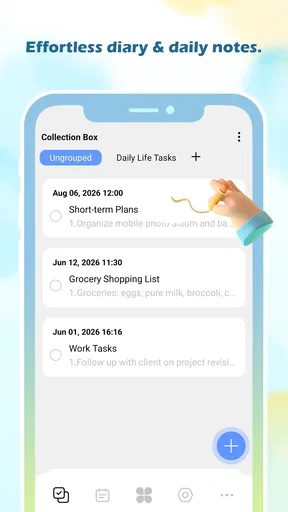
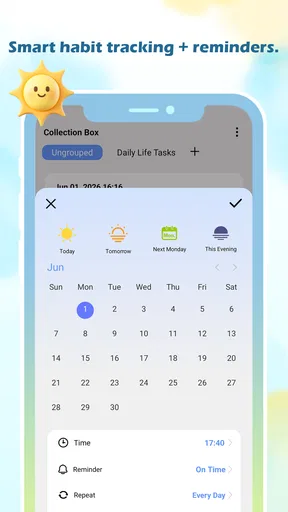
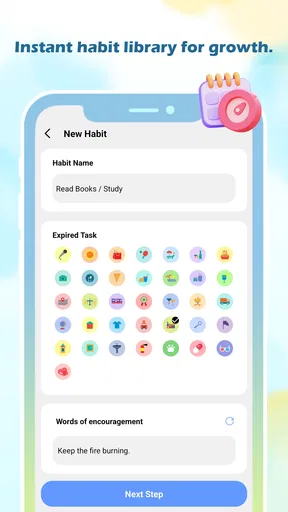
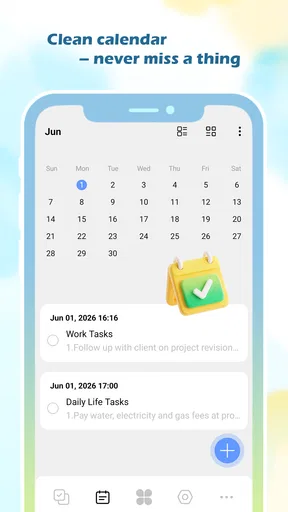
 Analysis by AppCompare
I approached TimeCue – Reminders & Alerts as a small productivity tool for people who want help noticing the right moment instead of carrying every intention in their head. Its idea is easy to understand: use time-based cues to turn vague plans into prompts you can act on. That sounds modest, but it can be useful when the problem is not knowing what to do, but remembering to do it at the point when it matters.
My overall impression is that TimeCue is best considered a focused companion rather than a complete task-management system. It belongs to the productivity side of the app world, is free to use, and is suitable for everyone from an age-rating perspective. The developer is Classified Prime LLc, and the current release is version 1.00.5. Those details matter less than the practical question: does a simple reminder app make daily routines easier without becoming another source of work?
How TimeCue feels in everyday use
The first thing I value in an app like this is speed of thought. When I remember something, I do not want to build a project, choose a complex workflow, or sort the item into several layers before saving it. A reminder should feel close to writing a note, while still giving that note a useful moment in the future. TimeCue’s appeal is tied to that directness. Its store message, “Seize the Day and find the Moment,” points toward timely prompts rather than an oversized planning system.
For a realistic example, imagine finishing work and remembering that a document needs to be sent after dinner. A paper note may be forgotten, while a general to-do list may be buried under unrelated tasks. A dedicated alert gives the intention a better chance of appearing when the action is actually possible. I would use TimeCue for that kind of short bridge between remembering and doing: a call to make after a meeting, a household task after arriving home, or a personal pause during a crowded day.
The important distinction is that a reminder is not the same as motivation. TimeCue can help place an idea in front of me, but it cannot decide whether the timing is realistic or whether the task deserves attention. I still need to choose a useful moment. If I schedule everything for the same part of the day, the app may faithfully reproduce my poor planning. The best results come from treating each alert as a small decision: what exactly do I need to remember, and when will that reminder be genuinely helpful?
Speed expectations and the value of a short workflow
With a focused app, perceived speed is mostly about how quickly I can move from an idea to a saved cue. The less mental overhead involved, the more likely I am to use it while the thought is fresh. TimeCue makes the most sense for users who prefer a narrow purpose over a dashboard filled with calendars, labels, projects, priorities, and progress views.
That simplicity also creates a trade-off. People who enjoy detailed planning may find a reminder-centered tool too limited compared with a full calendar or task manager. Those alternatives are better when a task has several steps, depends on other people, or needs a long-term view. TimeCue is more attractive when the desired outcome is simply “bring this back to my attention at the right time.”
Worth Reading Before You Choose

EA SPORTS FC Mobile 26 Is a Bigger Football Game, but It Takes Time

Flipboard Shows What News Apps Must Do Beyond the Feed

Switching to Android Auto Means Rethinking Your Driving Routine

Google Calendar Makes a Crowded Week Easier to Manage

Ludo King Makes the Most of the Minutes Between Plans

Baby Panda World Brings Quick Play to Modern Phones, but Its Game Library Feels Busy
I would also avoid judging a lightweight productivity app by the same standards as a collaboration platform. It does not need to replace shared schedules or elaborate work planning to be useful. Its job is smaller: reduce the chance that a time-sensitive thought disappears. That narrower role can make it easier to understand and quicker to reach for, particularly for someone who has stopped using complicated productivity systems because maintaining them became a task in itself.
What happens during heavy reminder use
The most demanding situation for any alerts app is not creating one occasional reminder. It is the crowded day: several appointments, personal errands, recurring routines, and last-minute changes all competing for attention. In that setting, the quality of the experience depends on whether the reminders remain understandable rather than becoming a wall of interruptions.
My practical advice is to keep the wording action-oriented. “Send the form” is more useful than “form,” because the first version tells me what to do when I see it later. I would also separate genuinely time-sensitive prompts from general ideas. If every minor thought receives an alert, the important ones lose their distinction. This is a non-obvious strength of a simple reminder workflow: it encourages me to be selective, but only if I impose that discipline myself.
A second useful habit is to review the next day before adding more cues. That quick check can reveal collisions, unrealistic timing, or reminders that no longer matter. A full task manager may expose this through projects and planning views, whereas TimeCue’s focused nature makes the review habit more important. The app can support a clean routine, but it cannot automatically make an overloaded schedule sensible.
For people managing many repeating responsibilities, I would compare the app carefully with the reminder system already built into their phone. A native option may have deeper integration with the device, while a separate app can feel more intentional and easier to keep mentally distinct. The better choice depends on whether the user wants a dedicated place for cues or prefers to keep everything inside the operating system’s existing tools.
Reliability, recovery, and the moments that matter
Reliability is the real test of a reminder product. A beautifully designed screen is not enough if I cannot trust the prompt to be there when needed. At the same time, I do not want to pretend that an app alone controls every part of alert delivery. Device settings, notification behavior, battery management, and user choices can all affect what appears and when.
That is why I would build a small verification habit around important reminders. After setting one, I would check that the wording and timing match the intended action, then avoid assuming that a reminder has replaced a critical backup. For an important travel departure, medical responsibility, or work deadline, I would still use the calendar, an alarm, or another dependable method as appropriate. TimeCue is more suitable as a practical layer of support than as the only safeguard for consequences that are difficult to reverse.
Recovery matters as much as the initial alert. Real days change: a meeting finishes late, a task is completed early, or an event becomes irrelevant. A useful reminder routine should include clearing or adjusting cues rather than allowing old prompts to accumulate. I would make that cleanup part of the day’s closing routine. It takes little time, and it prevents tomorrow from being shaped by yesterday’s assumptions.
Another recovery scenario is returning to the app after not using it for a while. A focused tool is easier to re-enter than a complex productivity workspace because there are fewer habits to reconstruct. That is one of the strongest reasons I can see for choosing TimeCue over a feature-heavy alternative. If I only need occasional, clear prompts, a smaller mental footprint may matter more than advanced organization.
Device constraints and practical expectations
TimeCue supports Android devices running version 8.0 or later, which gives it a broad place among users with older as well as newer phones. The app itself is free, and its content rating is Everyone, so it is positioned as an accessible everyday utility rather than a specialized professional product. It has reached over ten thousand installs, suggesting that it is not an entirely unknown experiment, though I would still assess it by my own routine rather than by adoption alone.
On a phone with limited storage, a small reminder utility is usually easier to justify than a large planning suite, but I would not confuse a modest purpose with guaranteed zero impact on the device. Any app that needs to remain relevant to scheduled prompts has to coexist with the phone’s own background behavior. Battery-saving modes and aggressive system cleanup can be especially important for people who depend on timely notifications.
My recommendation is to test the app with a low-stakes cue before trusting it with something crucial. Set a reminder for a convenient moment, observe how it fits into the phone’s notification experience, and then decide whether it deserves a larger role. This is not an accusation against TimeCue; it is sensible practice for any alert-based tool because the phone model and its settings can shape the experience as much as the app does.
Users with very old devices should also check compatibility before planning around it, since Android 8.0 is the minimum operating-system requirement. Someone already using a newer phone should have a wider range of choices, including built-in reminders and calendar tools. In that comparison, TimeCue needs to win through clarity and convenience, not through the mere fact that it can display a notification.
Who will get the most from it
I can see TimeCue working well for students who need prompts for short study blocks, parents balancing household actions, freelancers who switch between clients, and anyone whose day contains small commitments that are easy to overlook. It may also suit people who have tried elaborate task systems and abandoned them because the organization took more energy than the tasks themselves.
The most effective workflow is to reserve it for moments where timing changes the usefulness of the reminder. “Buy batteries sometime” belongs in a shopping list. “Buy batteries before leaving the store area” benefits more from a cue tied to a specific point in the day. That distinction is a concrete way to prevent the app from becoming a dumping ground for every thought.
I would be less enthusiastic for users who need shared task ownership, detailed project dependencies, rich notes, or a visual schedule across multiple people. A calendar is usually better for appointments and fixed events, while a full task manager is stronger for projects that need statuses, subtasks, and review. TimeCue should be chosen when the central need is timely personal attention, not comprehensive planning.
It is also not the right answer for someone who dislikes notifications altogether. No reminder app can solve notification fatigue by adding more prompts. In that case, a quiet calendar review, a paper planning method, or a single daily checklist may be more appropriate. TimeCue works best when alerts are welcome because they arrive with a clear purpose.
My performance verdict
After looking at the app through speed, busy-day behavior, reliability, and device constraints, I see a clear but limited role for it. TimeCue is appealing because it aims at a common problem without requiring users to adopt a complete productivity philosophy. Its value comes from turning a fleeting intention into a timed point of attention, and that can be enough to make a routine feel more manageable.
The main limitation is equally clear: a focused reminder tool cannot provide the planning depth of a calendar, task manager, or shared workspace. Heavy users must supply their own organization, wording, review habits, and backup strategy. That is not necessarily a flaw, but it means the app rewards users who want a simple instrument and may disappoint those looking for an all-in-one system.
Classified Prime LLc presents TimeCue as a free productivity app for everyone, with the current release at version 1.00.5 and support beginning with Android 8.0. I would start with a few meaningful reminders, test how they behave on my device, and keep only the cues that genuinely improve my day. My recommendation is to try it when you want timely nudges without the weight of a full task-management system.
In the end, I would recommend TimeCue to a friend who often says, “I knew I had to do that, but I forgot at the wrong moment.” I would not recommend it as a replacement for every productivity tool, nor as the sole protection against serious deadlines. Used selectively, it has a sensible purpose: helping a person seize a useful moment before it passes.
Pros
- Flexible recurring reminders for routines
- tasks
- and important dates.
- Clean interface makes creating and reviewing alerts straightforward.
- Useful notification scheduling helps reduce missed appointments and deadlines.
- Can support personal productivity without the complexity of a full task manager.
- Practical for organizing medication
- habits
- bills
- and everyday responsibilities.
Cons
- Some advanced reminder options may require time to discover and configure.
- Notification reliability can depend on device battery and background restrictions.
- Frequent alerts may become distracting when many reminders are active.
- Limited collaboration features may not suit shared household or team planning.
- Users may need to manually maintain reminder lists as schedules change.
FAQs for TimeCue – Reminders & Alerts
What is TimeCue – Reminders & Alerts used for?
TimeCue – Reminders & Alerts is designed to help you remember tasks, appointments, habits, and other time-sensitive activities. After reviewing the app, its main purpose is to provide timely notifications so important events are less likely to be forgotten. It can be useful for personal routines, medication schedules, work responsibilities, study plans, and everyday errands that require a clear reminder at a specific time.
How easy is it to create and manage reminders in TimeCue?
Creating a reminder in TimeCue is generally straightforward: you enter the task, select a date or time, and configure the alert according to your needs. The app is intended for quick daily use, so users should be able to review upcoming reminders and adjust or remove them without complicated steps. Before relying on it, check that notification permissions and alert settings are enabled on your device.
Does TimeCue support recurring reminders and alerts?
TimeCue – Reminders & Alerts is aimed at users who need more than one-time notifications, including repeated routines and regularly scheduled activities. Depending on the version and platform, recurring options may include daily, weekly, or custom schedules. Users with complex routines should review the available repeat settings carefully, because advanced recurrence patterns and features can vary between Android and iOS releases.
Will TimeCue notifications work reliably when the phone is locked or in battery-saving mode?
Reminder delivery depends partly on the operating system and the permissions granted to the app. For reliable alerts, TimeCue may need permission to send notifications, play sounds, use vibration, and operate without restrictive battery optimization. Android and iOS can delay background alerts under certain conditions, so it is wise to test an important reminder first rather than assuming every notification will arrive exactly as planned.
Is TimeCue – Reminders & Alerts free, and does it require an internet connection?
The availability of free features, premium tools, advertisements, or in-app purchases can depend on the current store version and the user’s platform. Basic reminder functions may work without a constant internet connection, although some features could require connectivity for synchronization, updates, or account-related services. Check the Google Play Store or Apple App Store listing before downloading to confirm pricing, subscriptions, and supported devices.


